The UX of a good dropdown
Most filter menus break the moment you try to pick a second thing. The fix is to read where the pointer is going, not what it touched.
Open a dropdown with a submenu. Hover the first item, then move your cursor toward the submenu that opens. If your cursor drifts over another item on the way, that item's submenu takes over, and the one you wanted disappears.
Every dropdown I had built until then did this. The fix is to read where the cursor is heading, not just which item it happens to cross.
A comparison of bad and good dropdown UX
Pointer direction
Draw two lines from where the pointer just was: one to the top inside corner of the open panel, one to the bottom. Between them is every direction that leads to that panel.
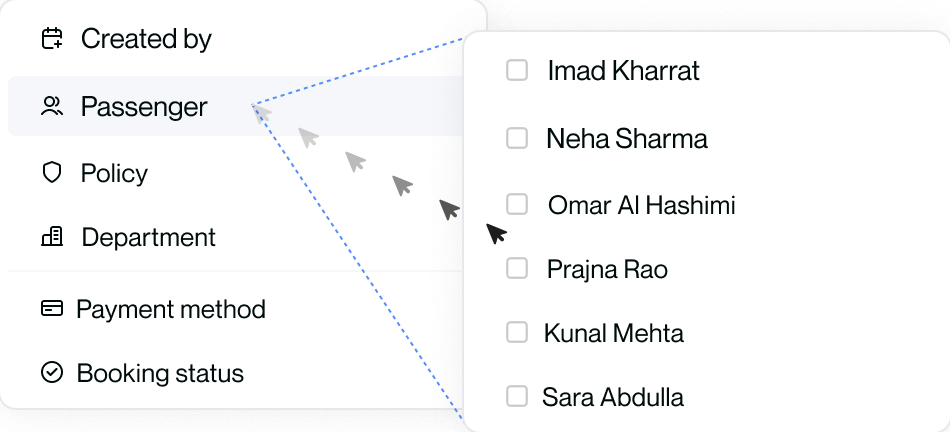
Then take the angle the pointer actually moved, atan2 of its delta. If it
lands between those two lines, ignore every row it crosses.
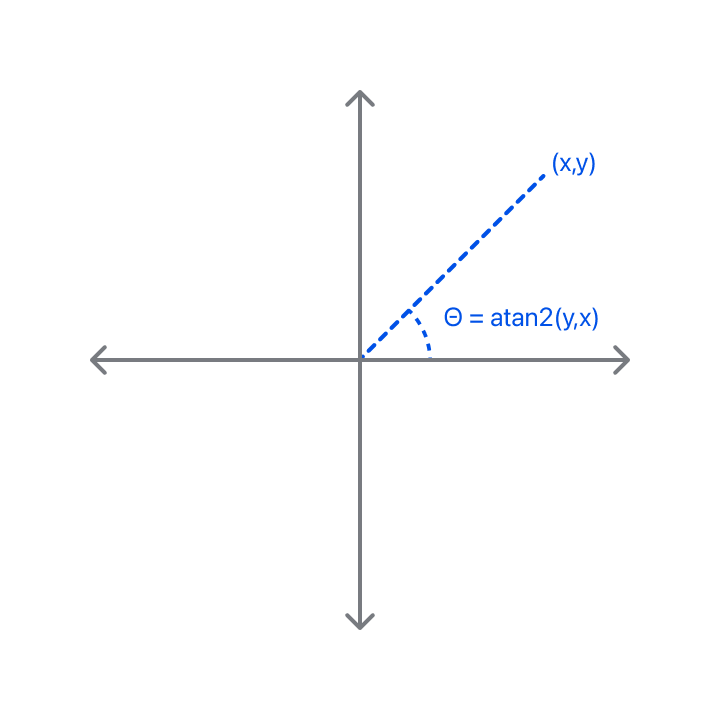
Angles, not positions. The shortest path out of the middle of a row aims at a corner, and anything that tests where the cursor is rather than where it is going reads that as a miss.
Fault tolerance
Hands are not straight lines, so the test has to be loose in two places:
- 15 degrees of slack on each side of the range.
- Two consecutive bad readings before giving up. One is a tremor, not a change of mind.
Then drop it after a second with no movement. A pointer that has stopped has stopped.
Pointer speed
Direction alone is not enough. People speed up toward a submenu and slow down as they arrive; they pause to read; they move faster across a longer gap (Fitts's Law) and through a wider tunnel (Steering Law).
You could track that continuously. Or you could treat stillness as the signal: if the pointer has not moved for a beat, and it is no longer on the parent row, the journey is over. Speed is movement over time, so a timeout is just the case where movement is zero. Lean long enough for motor impairment; Adobe found the simple version was enough.
No delay
Making rows wait a beat before opening also stops the flicker, and it makes every deliberate move down the list feel like the page is thinking. Aim beats delay, so open on hover, instantly.
Sample at 16ms, ignore touch and pen, and only track while a panel is open.
The method is Adobe's, and their write-up is the best thing published on this problem.